Your system resources, right in the taskbar.
TaskbarInfo shows CPU, memory, disk and network load in real time — without opening a single window. A tiny icon that lives in the Windows notification area and warns you at a glance when a resource is maxing out.
Windows 10 & 11 (64-bit) · no .NET runtime required · ad-free.
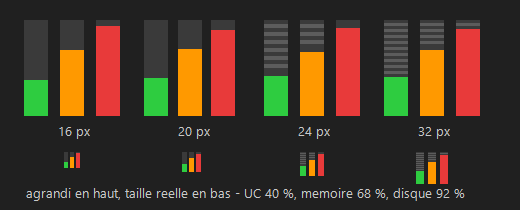
Keep an eye on your machine without thinking about it
Task Manager answers the question "why is my PC slow?" — but only when you open it. TaskbarInfo makes that information permanent and unobtrusive: the gauge is always there, tiny, and turns red as soon as a resource comes under pressure. You see the problem coming before it slows you down.
Light, clear, and built for Windows
- ✓ Negligible resource use. The icon is only redrawn when the display actually changes — the CPU stays idle.
- ✓ No windows at all. Everything fits in an icon and its tooltip; nothing clutters your desktop.
- ✓ Sharp at any resolution. The icon is drawn crisply for your display scale (100%, 125%, 150%, 200%).
- ✓ Adjustable colour thresholds. You decide at what percentage the gauge turns amber and then red.
- ✓ Automatic updates. The application keeps itself up to date, silently.
- ✓ Free and ad-free. No account, no tracking.
What the icon shows you
Processor
Overall CPU load, computed from real system times, every second.
Memory
RAM usage, with the detail in bytes shown in the tooltip.
Disk
Disk activity (and free space) — via the Windows performance counters.
Network
Utilisation of the busiest interface, shown in the tooltip.
Colour thresholds
Green, amber, red: set the alert levels yourself.
Taskbar pinning
Move the icon out of the overflow menu to keep it permanently visible (Windows 11).
Adjustable refresh rate
Refresh every 1, 2 or 5 seconds, as you prefer.
Automatic update
The application checks for and applies new versions without any action from you.
Start with Windows
Optional: launch when your Windows session starts.
Install it in a minute
Free, lightweight, ad-free. Works on Windows 10 and 11.